
Update 1: Rollout of AI-Powered Detailed Targeting Audience Exploration Tool
Meta is currently rolling out a detailed targeting exploration tool. This tool is powered by AI technology. It aims to accelerate the identification of your ideal audiences. It also helps uncover potential opportunities that you might have otherwise overlooked.
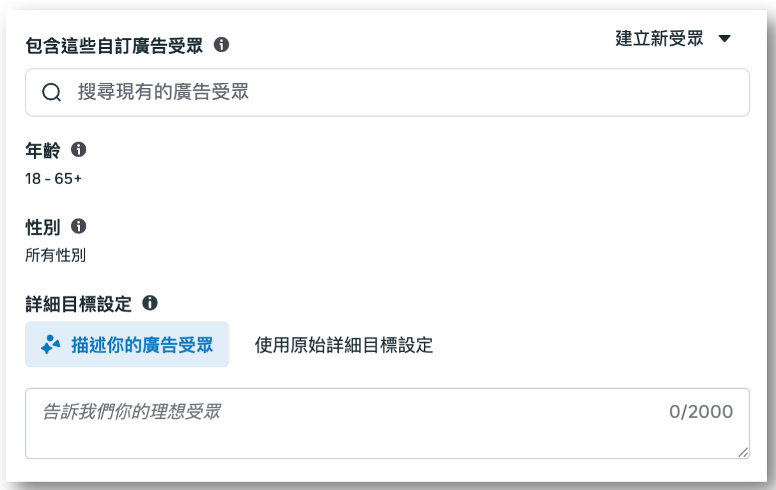
1. Describe Your Audience: Use everyday language to describe your customer. Example: “fitness enthusiasts who shop online.” No more manual searches through thousands of options.
2. AI Finds the Right Options: AI interprets your words. It instantly suggests relevant interests and behaviors. This helps you reach targets easily.
3. Maintain Control: Review each recommendation. Remove options that miss your strategy. Switch back to the traditional workflow anytime. No settings change without your permission.
4. Save Audience Setup Time: This tool helps upper-funnel campaigns. These include Awareness, Engagement, and Reach. It replaces manual browsing with text input. It provides suggestions in seconds. You get more time for ad creative.
5. Maintains Existing Classification Structure with No New Options: The tool explores existing targeting options. This update adds no new targets.
Prompt Guide: How to Describe Your Audience
To help advertisers get the most relevant recommendations, we encourage using the core prompt template below and including at least three “dimensions” in your description.
Core Prompt Template:
Looking for [Target]: [Demographics/Life Stage/Location], who are interested in [Interests/Topics/Creators], and frequently take [Behaviors/Actions/Engagement Signals]. They usually possess [Lifestyle/Values/Mindset] and are currently in a [State of Need/Situation/Motivation].
“Dimensions” Checklist (3 to 5 items recommended):
- Demographics/Life Stage: Age group, gender (if relevant), parents, students, new homeowners, job type, relationship stage.
- Interests: Categories, hobbies, brands, topics, creators, media platforms.
- Behaviors (Signals): Audience actions, including shopping patterns, research habits, content engaged with, activities participated in, and communities joined.
- Psychographics/Lifestyle: Values, mindset, sense of identity, priorities (e.g., budget, eco-friendly, luxury, health).
- State of Need / “Why Now”: What problem the audience is trying to solve, triggers of interest (e.g., upcoming trip, new job, training for a specific event).
Related Resources:
- Help Center: About Detailed Targeting
- Help Center: Using Detailed Targeting
Update 2: Rollout of Audience Tags
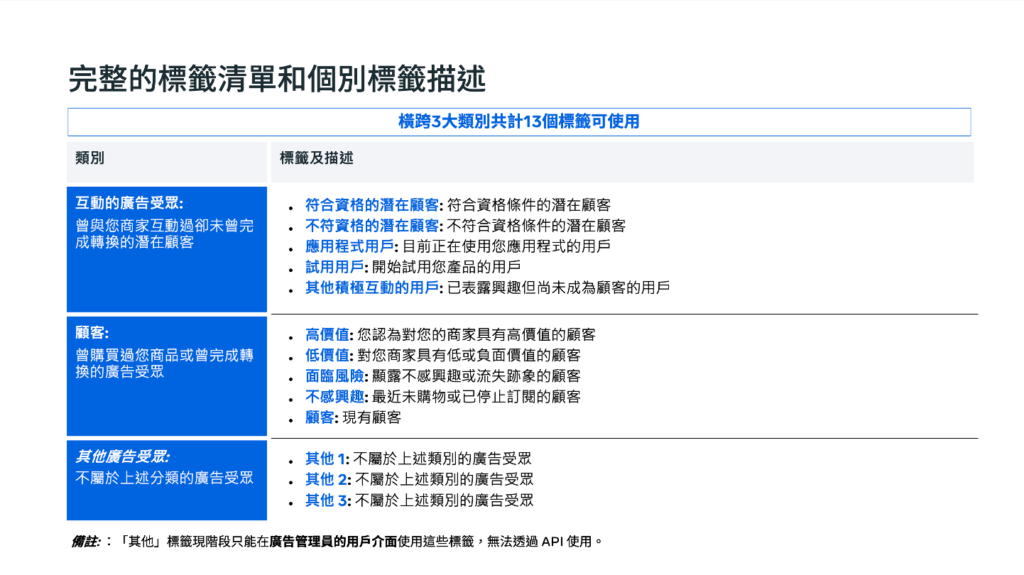
Meta is expanding Audience Tags. The rollout starts May 1, 2026. This tool standardizes audience descriptions. Examples include “High-Value” or “Qualified Leads.” It simplifies audience categorization. It helps you select segments for campaigns. It helps Meta understand audience status.
Meta increased available tags from 5 to 10. This covers more lifecycle use cases. Ads Manager adds three flexible “Other” tags. These categorize unique audiences. Tags now apply to Website and App Custom Audiences. Previously, they only applied to Customer Lists. Advertisers can now use the Marketing API for tags.
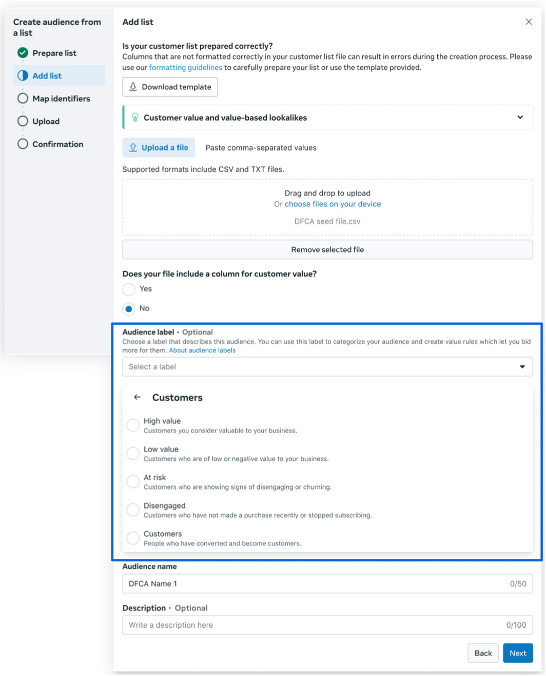
If you currently use Custom Audiences, we recommend applying tags to categorize your audiences starting now. This can be configured when creating or editing a Custom Audience in Ads Manager:
- Go to “Audiences” in Ads Manager.
- Create your Custom Audience.
- In the “Audience Tags” field: First select a tag category (e.g., Customer), then choose a tag from the dropdown menu.
Learn more about: Audience Tags
Update 3: Improvement to Website and App Custom Audience Settings for Purchase Events (Retention Period Extended from 180 Days to 730 Days)
Meta is improving the configuration for Mobile App and Website Custom Audiences to help you build more complete audience segments that better match your real customer base. These changes are particularly important for advertisers who use exclusion criteria in prospecting campaigns.
Purchase event retention moves from 180 days to 730 days (2 years). You can exclude past buyers better. This helps if customers remain active past six months.
What is Changing:
- The retention period for Website Custom Audiences for Purchase events is extended from 180 days to a maximum of 730 days (2 years).
- Starting May 18, new audiences can be created based on the extended retention period.
- Unless you opt out in the Audience Manager, existing Purchase event audiences currently set to a 180-day retention period will automatically update to 730 days starting May 18.
- This change applies only to Purchase events; other event types will remain at 180 days.
Expected Impact:
- Meta is continuously improving targeting, optimization, and measurement. Meta believes these backend improvements will not only deliver immediate results but will also drive better outcomes for advertisers in the long run. During this process, you may notice changes in estimated audience sizes and ad delivery patterns.
- If you are running prospecting campaigns, your prospecting CPA may fluctuate as the delivery system adjusts to more accurately reach new customer segments. This is an expected phenomenon and indicates that the improved system is functioning properly.
We recommend using the New Customer Metrics in your measurement tools (such as New Customer CPA, New Customer ROAS) to evaluate performance, rather than just measuring the overall Campaign CPA.
Help Center: Options for Creating a Website Custom Audience
Update 4: Rollout of Website Keywords Displayed Below Facebook Feed Ads
Meta always improves ad formats. This boosts performance for advertisers. It tailors the platform experience for consumers. Meta introduced Website Keywords for Mobile Feed ads. The system extracts keywords from landing pages. This highlights key business information.
This feature uses generative AI. It reviews your landing page content. It summarizes critical facts. Keywords appear below the ad. They sit above the comments. This gives users more business info. It encourages clicks. Users click keywords to visit your landing page. This works just like CTA buttons.
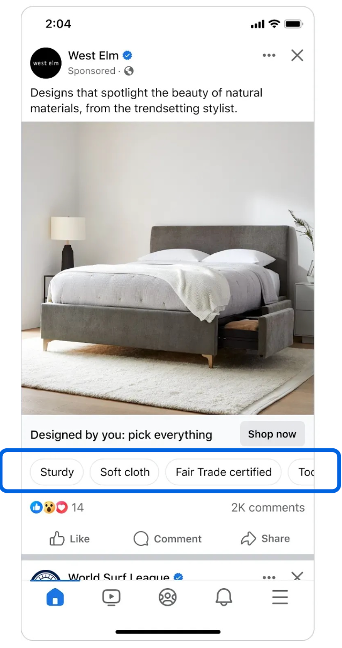
Meta is testing many ad formats. This is one method. Meta will test more keywords later. Examples include positive comments, reviews, and site details. This makes future Feed ads perform better.
Eligible advertisers will be able to manage this feature when creating campaigns in Ads Manager. Simply toggle on “Website Selling Points” under “Website Summary” within the “Ad Creative” settings at the ad level to preview the keywords extracted by the system from your website.
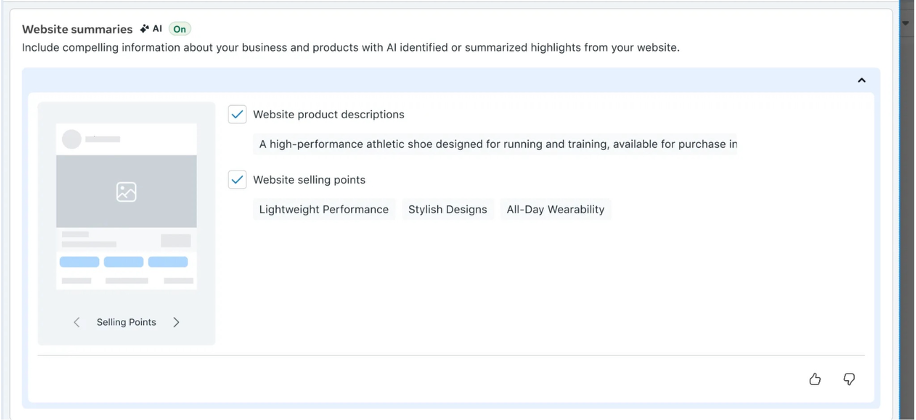
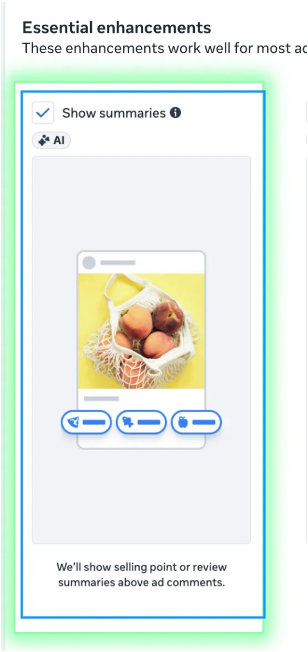
Additionally, to enable or disable this feature, go to Advantage+ Creative enhancements and select “Show Summary.”
Eligibility Criteria:
- Region/Language: Global (excluding the EU), supports English websites only.
- Advertiser Settings: Advertisers must enable “Website Selling Points” under “Website Summary” in the “Ad Creative” settings, and select “Show Summary” in Advantage+ Creative enhancements.
- Format: Single image ads in the Facebook Mobile Feed (destination URL required).
Related Resources:
- Help Center: About Advantage+ Creative
- Help Center: About Ad Sources in Meta Ads Manager
Source: Meta

.png)
