How can you measure performance when your website appears in AI Overviews or conversational AI search experiences? Google Search Console, Bing Webmaster Tools, and Google Merchant Center have gradually introduced official AI performance reports, allowing website owners to evaluate their visibility in generative AI search from different perspectives—including exposure, citations, and product visibility in AI-powered shopping experiences.
This article compares the core features, use cases, data differences, and limitations of these three free AI performance monitoring tools. It also explains how they can be used together to help SEO professionals, content marketers, and e-commerce businesses build a performance measurement framework for the AI search era and understand whether their websites are truly being discovered, cited, and recommended by AI.
Why Do We Need New Performance Reports in the AI Era?
Generative AI search is changing how website visibility is measured. Traditionally, SEO professionals have relied on metrics such as average rankings, impressions, click-through rates, and organic traffic to evaluate performance. However, in experiences such as AI Overviews, AI Mode, and Copilot, website content may be summarized into AI-generated answers or cited as a source without necessarily generating an immediate click.
As a result, traditional rankings and traffic alone can no longer provide a complete picture of a brand’s actual visibility in search. Metrics such as AI impressions, citation frequency, cited pages, search intent, and product recommendation contexts are becoming increasingly important for measuring performance in the AI search era.
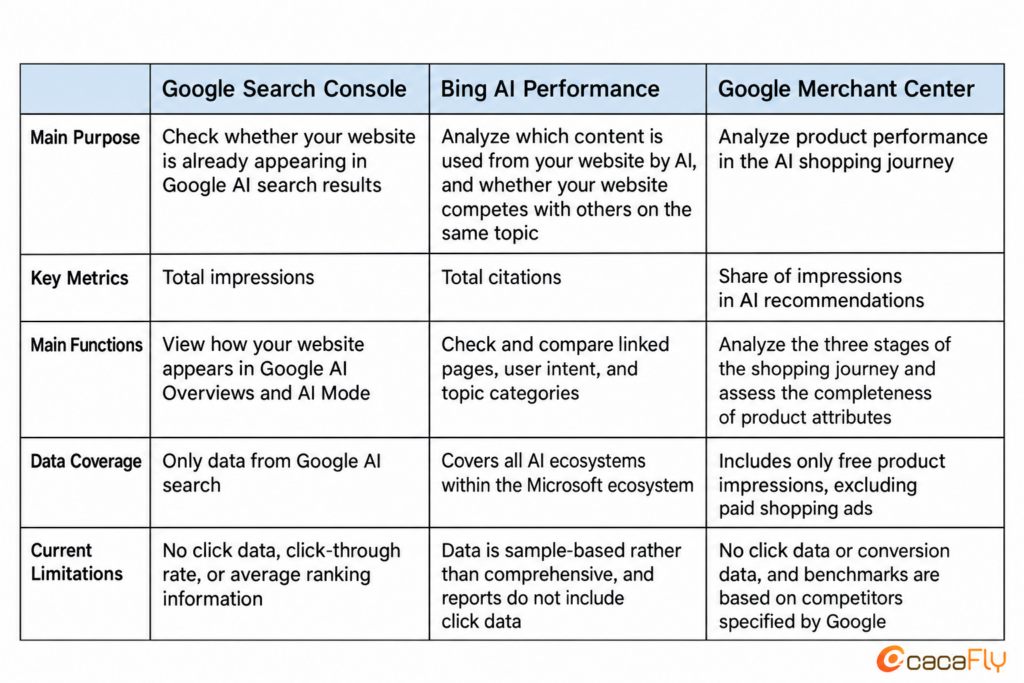
Google vs. Bing AI Performance Reports: A Quick Comparison of Features and Metrics
Track Google AI Performance: Google Search Console AI Performance Report
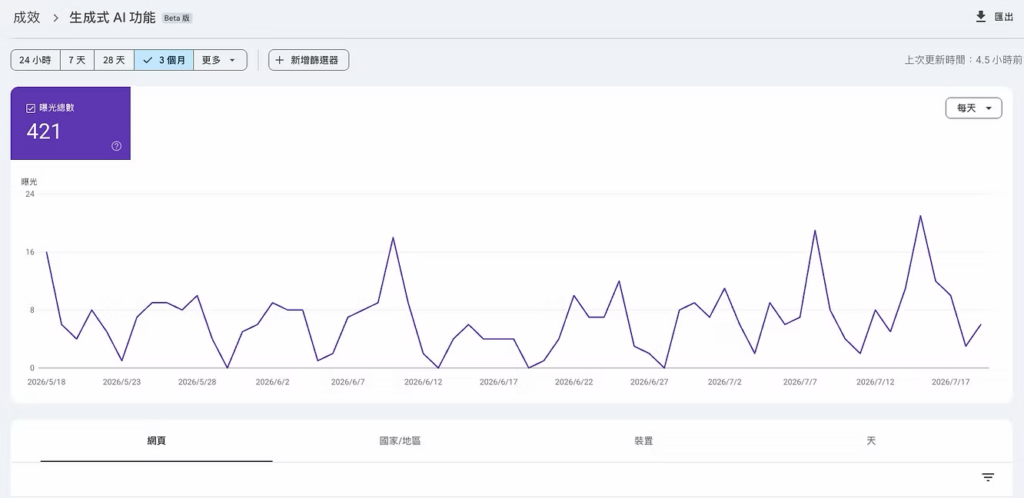
Google officially launched the Generative AI Performance Report in Search Console on June 3, 2026, and expanded its availability to websites worldwide on August 31, 2026.
The report provides a dedicated view of generative AI performance, allowing website owners to use Google’s first-party data to understand how their pages appear across Google’s generative AI search experiences, including AI Overviews and AI Mode. Instead of relying solely on traffic fluctuations or third-party tools, website owners can now gain more direct insights into their visibility within Google’s AI-powered search experiences.
Advantages of the Google Search Console Generative AI Report
- Validate the value of AI visibility: Website owners can use official Google data to identify which content appears more frequently across Google’s generative AI search experiences, providing useful insights for future content strategy and optimization.
- Analyze AI search performance from multiple perspectives: The report provides dimensions such as page, country/region, device, and date, helping website owners understand how AI search visibility varies across markets, devices, and time periods.
- Official first-party data: Unlike third-party tools that estimate AI visibility through prompt testing, model sampling, or other methods, Search Console provides Google’s first-party data, offering a more direct view of how websites appear across Google’s generative AI search experiences.
Limitations of Google Search Console AIO Analysis
- Limited to impression data: The report currently provides only total Impressions and does not yet include clicks, click-through rate (CTR), average position, or search queries. This means that while you can see whether your content has appeared in AI search experiences, you cannot determine how many users actually clicked through to your website.
- Multiple links in the same AI response count as one impression: If multiple links from the same website appear within a single AI-generated response, Google counts them as one impression by default.
- Cannot be added directly to standard Search performance data: Data in the Generative AI report is already included within the standard Search performance report. Adding the impressions from both reports together would therefore result in double counting. It is better to analyze AI Search and standard Search separately before comparing their performance.
- Not yet available to everyone: The Generative AI Performance report is still being rolled out in phases, so some websites or accounts may not have access yet. If the report is not visible, it does not necessarily mean that your website has no AI visibility—the feature may simply not have been enabled for your account yet.
Analyze Bing AI Citations: Bing AI Performance Generative AI Report
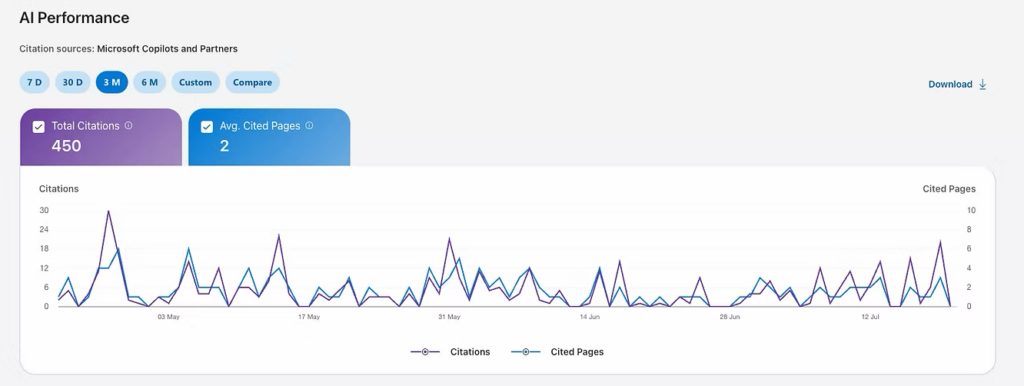
BThe AI Performance report in Bing Webmaster Tools is currently one of the most mature generative AI analytics tools offered by a search engine. Unlike traditional SEO reports that focus on rankings and clicks, this report is designed to measure how often a website is cited as a source across Microsoft Copilot, Bing AI summaries, and partner experiences.
Advantages of the Bing AI Performance Report
- Understand why AI cites your content: Through Grounding Queries, website owners can measure the role their content plays in AI-generated answers that may not result in a click, while gaining insight into how AI systems reformulate and interpret users’ questions.
- Evaluate your website’s competitiveness on specific topics: Beyond citation counts, Citation Shares help brands understand how their visibility compares with other sources for specific topics.
- See which queries cite which pages: Website owners can explore cited pages from individual queries or work backward from a page to identify the queries that triggered its citations, enabling more precise content performance analysis.
- Understand user search intent: The report provides Intents classifications to help determine whether users are looking for information, comparing products, or preparing to make a purchase, allowing content strategies to better address different stages of the customer journey.
- Free, first-party official data: While many third-party AI tracking tools can be costly and rely on estimated data, Microsoft provides first-party data directly through Bing Webmaster Tools, offering a valuable and reliable reference for AI visibility analysis.
Limitations of Bing AI Performance Analysis
- No click or traffic data: Citation counts only indicate that content has been cited; they do not necessarily mean that users visited the website. The report currently does not show the actual traffic generated by AI citations.
- Data does not represent a complete record: Microsoft explicitly states that the data is sampled rather than a complete record of all citations. As a result, citations with lower frequency may not appear in the report.
- Limited to the Microsoft ecosystem: The report only reflects website performance across Microsoft Copilot and Bing AI search experiences. It does not provide citation data from Google AI Overviews or other AI search platforms.
- Reporting delay: Data is typically updated with a delay of approximately 2–3 days, so the report does not provide real-time visibility into the latest citations.
AI Shopping Journey Analysis: Google Merchant Center Report
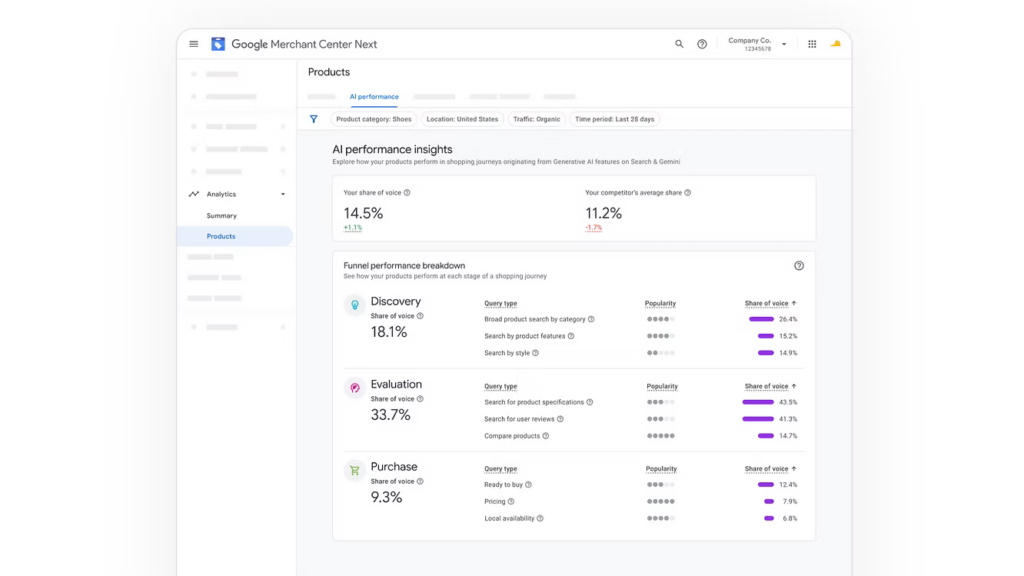
Google Merchant Center introduced AI Performance Insights in 2026, a tool designed specifically to analyze how products perform when consumers search during their shopping journey. It helps merchants understand whether their products have the opportunity to appear in Google AI-powered recommendations as consumers search at different stages of the purchasing process.
The report divides the shopping journey into three stages based on the user’s search intent:
- Discovery: Users are in the early research stage and typically conduct broad category searches or ask for recommendations based on their needs or preferences (e.g., “Recommend a backpack for hiking”).
- Evaluation: Users begin comparing product specifications, reading reviews, or searching for specific models (e.g., “Compare the durability of two waterproof cameras”).
- Purchase: Users demonstrate strong purchase intent by asking about prices, availability, or pickup options (e.g., “Where can I buy the cheapest iPhone 16?”).By analyzing which stage generates the most visibility for a product, merchants can better determine whether their product data aligns with how AI evaluates and recommends products.
Advantages of the Google Merchant Center Report
- Understand at which shopping stage your products are more likely to be recommended by AI: The report categorizes consumer searches into three stages—Discovery, Evaluation, and Purchase—helping merchants understand whether their products are more likely to appear in Google AI recommendations when consumers are exploring, comparing, or preparing to purchase products.
- Identify missing product information: The report highlights product attributes that consumers frequently care about, such as color, material, size, and style, and identifies where product data may be incomplete. Merchants can use these insights to enrich their product information and increase the likelihood of being recommended by AI.
- Evaluate the competitiveness of brand visibility: Merchants can review their brand’s share of visibility in AI-powered shopping searches and compare it with similar brands, helping them understand how competitive their brand’s exposure is within the market.
Limitations of Google Merchant Center AI Performance Analysis
- Only tracks free product listings: The report currently measures visibility from Free Listings only and does not include performance from paid advertising, such as Shopping Ads or Performance Max (PMax).
- No click or conversion data: The report currently provides only impressions and visibility share, without clicks, click-through rate (CTR), or conversion data. This means merchants can see whether their products are being surfaced by AI, but cannot directly determine whether that visibility generates traffic or revenue.
- Does not show users’ actual search queries: Merchants can view Query Themes or broader topic categories rather than the exact search terms entered by users.
- Some metrics may be misleading: When impression volume is low, certain metrics may appear as 0%. If there are no comparable competitors, a metric may show 100%, which does not necessarily reflect actual market performance.
- Regional and access limitations: Google Merchant Center AI Performance Insights is currently still a limited-access feature, available only in selected countries and accounts, with availability gradually expanding globally.
How to Choose the Right AI Performance Report?
1. Want to know whether your website appears in Google AI search results? Choose Google Search Console
Suitable for all types of websites. It helps you understand whether your site appears in Google AI Overviews and AI Mode, as well as which pages receive more AI visibility.
2. Want to understand why AI cites your content? Choose Bing AI Performance
Ideal for content-driven websites, brand websites, and blogs. In addition to citation counts, it helps identify which topics and pages are more likely to be cited by AI, providing useful insights for content optimization.
3. Want to analyze product performance in AI-powered shopping searches? Choose Google Merchant Center
Ideal for e-commerce websites. It helps you understand at which stage of the shopping journey your products are more likely to be recommended by AI and identify which product information may need to be improved or completed.充。
AI Performance Analysis: How to Improve AIO Performance?
If you want your website to appear more frequently in Google AI Overviews or AI Mode, consider optimizing the following areas:
1. Make Your Content Easy for Google to Crawl and Rank
Google’s AI-generated answers often reference content that already performs well in organic search. Therefore, improving AI visibility still starts with solid SEO fundamentals, giving important pages a better chance of ranking prominently in search results.
2. Answer the User’s Question Up Front
Start your article with a short paragraph that directly answers the user’s main question before going into further detail. This helps readers find answers faster while making it easier for AI systems to understand the key message of your content.
3. Strengthen Structured Data (Schema)
Implement relevant Schema markup, such as Article, FAQ, or HowTo, where appropriate. Structured data can help search engines better understand the content and structure of your pages.
4. Build Content Depth Around the Same Topic
Instead of relying on a single article, consistently create related content around the same topic and connect those pages through internal links. As your website builds more comprehensive topic coverage, AI systems can better understand your site’s expertise and relevance in that area.
AIO Does Not Replace SEO — It Expands the Scope of Search Performance Monitoring
The emergence of generative AI performance reports does not mean that SEO is becoming less important. On the contrary, SEO remains an important foundation for gaining visibility in AI-powered search results. If a website struggles to rank well in Google Search, its chances of being cited by AI are generally lower as well.
Different AI performance reports can help us understand website performance from different perspectives:
- Google Search Console: See whether your website appears in Google AI Overviews and AI Mode, and identify which pages receive greater AI visibility.
- Bing AI Performance: Understand which content is more frequently cited by AI and identify topics with further optimization opportunities.
- Google Merchant Center: Analyze at which stage of the shopping journey your products are more likely to be recommended by AI and identify missing product information that could be improved.
If you want to increase your website’s visibility in AI search, maintaining strong SEO fundamentals is only part of the process. Regularly reviewing AI performance reports can help you understand which content is more likely to be cited, which product information needs improvement, and where further optimization opportunities exist.
If you want to improve your website’s visibility in AI-powered search, contact the cacaFly team to build a more comprehensive AI search optimization strategy.
Struggling with Brand Development and Marketing?
Reach out to us, and let the professional consultancy team at cacaFly to collaborate with you in creating a brighter future!
PM: cacaFly Malaysia Facebook
Email: [email protected]
Mobile: 017-7486433
cacaFly Malaysia is always at the forefront of digital marketing and committed to being the most reliable partner of our clients, priding ourselves in offering premium services with utmost enthusiasm and professionalism. Specializing in serving brand and performance oriented clients, our one-stop digital marketing services ranges from early research, mid-term advertising, MarTech application and creative production to data analysis and strategy optimization, cacaFly Malaysia has assisted countless brands and online merchant improve their performance and expand their businesses. If you need help with digital marketing strategy, ad placements etc., contact us now! PM us on cacaFly Malaysia Facebook or email us at [email protected]
Source
- Google Search Central(2026),Introducing Search Generative AI performance reports in Search Console.
- Google Search Central(2026),Optimizing your website for generative AI features on Google Search.
- Microsoft Bing Webmaster Tools(2026),AI Performance in Bing Webmaster Tools.
- Google Merchant Center Help(2026),About AI performance insights.